
How to Interface OLED Display with ESP32?

This guide will show you how to connect an OLED display module to an ESP32 development board. In this implementation, we have an OLED Graphic Display that is driven by an SSD1306 OLED Driver IC and exchanges data over SPI. Display text, bitmap images, graphics, and more on an OLED screen with an ESP32 in your next do-it-yourself project.

Introduction
Organic light-emitting diodes (OLEDs) are a type of high-tech display that employs a film of organic substance sandwiched between two electrodes (anode and cathode), which then generates light when a voltage is placed across the electrodes.
An OLED Display’s key benefit is that it generates its own illumination and does not require a separate backlight. Since this is the case, OLED displays typically outperform LCD screens in terms of contrast, brightness, and viewing angle.
Organic light-emitting diodes (OLEDs) are a type of high-tech display that employ a film of organic substance sandwiched between two electrodes (anode and cathode), which then generates light when a voltage is placed across the electrodes.
An OLED Display’s key benefit is that it generates its own illumination and does not require a separate backlight. Since this is the case, OLED displays typically outperform LCD screens in terms of contrast, brightness, and viewing angle.
SSD1306 OLED Display
Is an OLED screen something you’d like to incorporate into your own creation? Do you want to put up a screen that shows things like your IP address, web server address, and other crucial info? If so, I highly recommend looking into the SSD1306 OLED Display Module.

This screen is a 128×64 Monochrome OLED Display. The diagonal length is 0.96 inches. The SSD1306 OLED Driver IC is used in this display.
The SSD1306 OLED Display family includes three distinct types of data connections:
- 8-bit 6800 Parallel Interface
- 3 or 4 wire SPI
- I2C
The I2C and SPI types of OLEDs are particularly widespread. Changing from SPI to I2C is doable (you just have to solder/de-solder certain SMD resistors). It uses 4-wire SPI Communication, which is what my model calls for.

The I2C and SPI types of OLEDs are particularly widespread. Changing from SPI to I2C is doable (you just have to solder/de-solder certain SMD resistors). It uses 4-wire SPI Communication, which is what my model calls for.
So, 8 Pages * 128 Segments * 8 Bits = 8192 Bits (1024 Bytes).

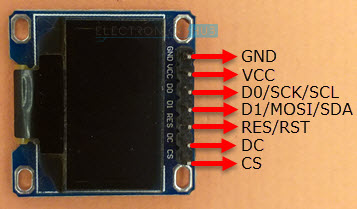
Pinout of OLED Display Module
The following table shows the Pinout of 7-pin SPI based OLED Display Module.
| Pin (Alternative Names) | Description |
| GND | Ground |
| VCC | Power Supply |
| D0 (SCK, SCL, CLK) | Clock |
| D1 (MOSI, SDA) | Data |
| RES (RST) | Reset |
| DC (A0) | Data / Command Selection |
| CS | Chip Select |
Power Supply
The OLED panel itself requires VCC = 7V to 15V, while the SSD1306 OLED Driver IC operates at VDD = 1.65V to 3.3V. The OLED Display Module’s charge pump circuit (for Panel) and regulator (for Driver IC) allow it to meet these varying voltage needs from a single source (usually between 3V and 5V).
The OLED panel itself requires VCC = 7V to 15V, while the SSD1306 OLED Driver IC operates at VDD = 1.65V to 3.3V. The OLED Display Module’s charge pump circuit (for Panel) and regulator (for Driver IC) allow it to meet these varying voltage needs from a single source (usually between 3V and 5V).
ESP32 OLED Display Interface
This allows boards such as Arduino (5V logic) and ESP32 to interface with the OLED Display Module (with 3.3V logic).

As seen in the graphic above, the ESP32 Development Board supports both the High-Speed SPI Interface (HSPI) and the Very-Slow SPI Interface (VSPI). In this case, we can use the VSPI add-on module. When using VSPI with an ESP32, you’ll need to connect these pins:
| VSPI Pin | GPIO Pin |
| VSPI_MOSI | GPIO 23 |
| VSPI_MISO | GPIO 19 |
| VSPI_CLK | GPIO 18 |
| VSPI_CS | GPIO 5 |
Please take note that ESP32 has a total of four SPI peripherals. (SPI-0, –1, –2, –3, and —4). Since SPI Flash IC requires its own unique SPI0 port, SPI1 is able to share the same hardware. This means that the only options for connecting SPI devices are HSPI and VSPI.
The connections between the ESP32 and the OLED Display Module are detailed in the table below. Since this is an SPI OLED Display, seven wires need to be connected.
| OLED Display | ESP32 |
| GND | GND |
| VCC | 3.3V |
| D0 (SCK) | GPIO 18 |
| D1 (MOSI) | GPIO 23 |
| RES | GPIO 17 |
| DC | GPIO 16 |
| CS | GPIO 5 |
Components Required
- ESP32 DevKit Development Board
- OLED Display Module
- Breadboard
- Connecting Wires
- Micro USB Cable
Circuit Diagram
The following image shows the circuit diagram for Interfacing SPI OLED Display with ESP32.
Preparing Arduino IDE
In order to get started writing code for an SSD1306 OLED Display, you’ll need to grab a few libraries for the Arduino IDE.
Launch the Arduino Integrated Development Environment (IDE), then go to Tools -> Manage Libraries. . . Arduino-IDE-OLED-Library-1

You can start by reading my in-depth guide on setting up the ESP32 Board in the Arduino IDE.

Search for “gfx” and then install “Adafruit GFX Library” once you’ve put in the SSD1306 Library. Lines, circles, rectangles, and other elementary shapes can be displayed with this Adafruit library.

Once the required libraries have been downloaded, you may close the library manager window. Now, in the Arduino IDE, go to Tools > Board > ESP32 Arduino > ESP32 Dev Module and make sure that the ESP32 Board is chosen.
Testing ESP32 OLED Display
Now that we have everything wired up, we can begin writing some test code for the ESP32 to show off some text and images on the OLED Display. Here I am experimenting with the OLED display’s ability to display standard text, inverted text, scrolling text, ASCII characters, and a variety of font sizes.
I also added the necessary code to display various shapes and lines, including rectangles, filled rectangles, rounded rectangles, filled rounded rectangles, circles, filled circles, triangles, and filled triangles.
| #include <SPI.h> | |
| #include <Wire.h> | |
| #include <Adafruit_GFX.h> | |
| #include <Adafruit_SSD1306.h> | |
| #define SCREEN_WIDTH 128 | |
| #define SCREEN_HEIGHT 64 | |
| #define OLED_MOSI 23 | |
| #define OLED_CLK 18 | |
| #define OLED_DC 16 | |
| #define OLED_CS 5 | |
| #define OLED_RESET 17 | |
| Adafruit_SSD1306 display(SCREEN_WIDTH, SCREEN_HEIGHT, | |
| OLED_MOSI, OLED_CLK, OLED_DC, OLED_RESET, OLED_CS); | |
| const unsigned char electronicshub_logo [] PROGMEM = { | |
| 0x00, 0x00, 0x00, 0x00, 0x00, 0x00, 0x00, 0x00, 0x00, 0x00, 0x00, 0x00, 0x00, 0x00, 0x00, 0x00, | |
| 0x00, 0x00, 0x00, 0x00, 0x00, 0x00, 0x00, 0x00, 0x00, 0x00, 0x00, 0x00, 0x00, 0x00, 0x00, 0x00, | |
| 0x00, 0x00, 0x00, 0x00, 0x00, 0x00, 0x00, 0x00, 0x00, 0x00, 0x00, 0x00, 0x00, 0x00, 0x00, 0x00, | |
| 0x00, 0x00, 0x00, 0x00, 0x00, 0x00, 0x00, 0x00, 0x00, 0x00, 0x00, 0x00, 0x00, 0x00, 0x00, 0x00, | |
| 0x00, 0x00, 0x00, 0x00, 0x00, 0x00, 0x00, 0x00, 0x00, 0x00, 0x00, 0x00, 0x00, 0x00, 0x00, 0x00, | |
| 0x00, 0x00, 0x00, 0x00, 0x00, 0x00, 0x00, 0x00, 0x00, 0x00, 0x00, 0x00, 0x00, 0x00, 0x00, 0x00, | |
| 0x00, 0x00, 0x00, 0x00, 0x00, 0x00, 0x00, 0x00, 0x00, 0x00, 0x00, 0x00, 0x00, 0x00, 0x00, 0x00, | |
| 0x00, 0x00, 0x00, 0x00, 0x00, 0x00, 0x00, 0x00, 0x00, 0x00, 0x00, 0x00, 0x00, 0x00, 0x00, 0x00, | |
| 0x00, 0x00, 0x00, 0x00, 0x00, 0x00, 0x00, 0x00, 0x00, 0x00, 0x00, 0x00, 0x00, 0x00, 0x00, 0x00, | |
| 0x00, 0x00, 0x00, 0x00, 0x00, 0x00, 0x00, 0x00, 0x00, 0x00, 0x00, 0x00, 0x00, 0x00, 0x00, 0x00, | |
| 0x00, 0x00, 0x00, 0x00, 0x00, 0x00, 0x00, 0x00, 0x00, 0x00, 0x00, 0x00, 0x00, 0x00, 0x00, 0x00, | |
| 0x00, 0x00, 0x00, 0x00, 0x00, 0x00, 0x00, 0x00, 0x00, 0x00, 0x00, 0x00, 0x00, 0x00, 0x00, 0x00, | |
| 0x00, 0x00, 0x00, 0x00, 0x00, 0x00, 0x00, 0x00, 0x00, 0x00, 0x00, 0x00, 0x00, 0x00, 0x00, 0x00, | |
| 0x00, 0x00, 0x00, 0x00, 0x00, 0x00, 0x00, 0x00, 0x00, 0x00, 0x00, 0x0f, 0xff, 0xff, 0xff, 0x80, | |
| 0x00, 0x00, 0x00, 0x00, 0x00, 0x00, 0x00, 0x00, 0x00, 0x00, 0x00, 0x0f, 0xff, 0xff, 0xff, 0x80, | |
| 0x00, 0x00, 0x00, 0x00, 0x00, 0x00, 0x00, 0x00, 0x00, 0x00, 0x00, 0x0f, 0xff, 0xff, 0xff, 0x80, | |
| 0x00, 0x00, 0x00, 0x00, 0x00, 0x00, 0x00, 0x00, 0x00, 0x00, 0x00, 0x0f, 0xff, 0xff, 0xff, 0x80, | |
| 0x00, 0x00, 0x00, 0x00, 0x00, 0x00, 0x00, 0x00, 0x00, 0x00, 0x00, 0x0f, 0xff, 0xff, 0xff, 0x80, | |
| 0x00, 0x00, 0x00, 0x00, 0x00, 0x00, 0x00, 0x00, 0x00, 0x00, 0x00, 0x0f, 0xff, 0xff, 0xff, 0x80, | |
| 0x03, 0xe0, 0x07, 0xc3, 0x87, 0xcf, 0x03, 0x02, 0x11, 0x07, 0x04, 0x0f, 0xbd, 0xbd, 0xc7, 0x80, | |
| 0x03, 0xe4, 0x07, 0xc3, 0xc7, 0xcf, 0x07, 0x82, 0x11, 0x07, 0x8e, 0x0f, 0xbd, 0xbd, 0xc7, 0x80, | |
| 0x02, 0x04, 0x04, 0x06, 0xc1, 0x01, 0x84, 0xc2, 0x11, 0x0d, 0x8a, 0x0f, 0xbd, 0xbd, 0xf3, 0x80, | |
| 0x02, 0x04, 0x04, 0x04, 0x61, 0x00, 0x88, 0x42, 0x11, 0x08, 0x8a, 0x0f, 0xbd, 0xbd, 0xfb, 0x80, | |
| 0x02, 0x04, 0x04, 0x0c, 0x21, 0x00, 0x88, 0x43, 0x11, 0x10, 0x08, 0x0f, 0xbd, 0xbd, 0xfb, 0x80, | |
| 0x02, 0x04, 0x04, 0x08, 0x01, 0x00, 0x88, 0x23, 0x11, 0x10, 0x08, 0x0f, 0xbd, 0xbd, 0xfb, 0x80, | |
| 0x02, 0x04, 0x04, 0x08, 0x01, 0x00, 0x88, 0x23, 0x11, 0x10, 0x08, 0x0f, 0xbd, 0xbd, 0xfb, 0x80, | |
| 0x02, 0x04, 0x04, 0x08, 0x01, 0x00, 0x90, 0x23, 0x11, 0x10, 0x08, 0x0f, 0xbd, 0xbd, 0xfb, 0x80, | |
| 0x02, 0x04, 0x04, 0x08, 0x01, 0x00, 0x90, 0x22, 0x91, 0x10, 0x08, 0x0f, 0xbd, 0xbd, 0xf7, 0x80, | |
| 0x02, 0x04, 0x04, 0x08, 0x01, 0x00, 0x90, 0x22, 0x91, 0x10, 0x0e, 0x0f, 0xbd, 0xbd, 0xc7, 0x80, | |
| 0x03, 0x84, 0x07, 0x08, 0x01, 0x00, 0x90, 0x22, 0x91, 0x10, 0x06, 0x0f, 0x81, 0xbd, 0xc7, 0x80, | |
| 0x03, 0x84, 0x07, 0x08, 0x01, 0x07, 0x90, 0x22, 0xd1, 0x10, 0x03, 0x0f, 0x81, 0xbd, 0xf7, 0x80, | |
| 0x02, 0x04, 0x04, 0x08, 0x01, 0x07, 0x10, 0x22, 0x51, 0x10, 0x01, 0x0f, 0xbd, 0xbd, 0xfb, 0x80, | |
| 0x02, 0x04, 0x04, 0x08, 0x01, 0x06, 0x10, 0x22, 0x51, 0x10, 0x01, 0x0f, 0xbd, 0xbd, 0xfb, 0x80, | |
| 0x02, 0x04, 0x04, 0x08, 0x01, 0x02, 0x10, 0x22, 0x51, 0x10, 0x01, 0x0f, 0xbd, 0xbd, 0xfb, 0x80, | |
| 0x02, 0x04, 0x04, 0x08, 0x01, 0x02, 0x08, 0x22, 0x31, 0x10, 0x01, 0x0f, 0xbd, 0xbd, 0xfb, 0x80, | |
| 0x02, 0x04, 0x04, 0x08, 0x01, 0x01, 0x08, 0x22, 0x31, 0x10, 0x01, 0x0f, 0xbd, 0xbd, 0xfb, 0x80, | |
| 0x02, 0x04, 0x04, 0x0c, 0x21, 0x01, 0x08, 0x42, 0x31, 0x10, 0x01, 0x0f, 0xbd, 0xdb, 0xfb, 0x80, | |
| 0x02, 0x04, 0x04, 0x04, 0x61, 0x01, 0x88, 0x42, 0x31, 0x08, 0x99, 0x0f, 0xbd, 0xdb, 0xf3, 0x80, | |
| 0x02, 0x04, 0x04, 0x06, 0xc1, 0x00, 0x84, 0xc2, 0x11, 0x0d, 0x8b, 0x0f, 0xbd, 0xc3, 0xc7, 0x80, | |
| 0x03, 0xe7, 0xc7, 0xc3, 0xc1, 0x00, 0x87, 0x82, 0x11, 0x07, 0x8e, 0x0f, 0xbd, 0xe7, 0xc7, 0x80, | |
| 0x03, 0xe7, 0xc7, 0xc3, 0x81, 0x00, 0x83, 0x02, 0x11, 0x07, 0x06, 0x0f, 0xff, 0xff, 0xff, 0x80, | |
| 0x00, 0x00, 0x00, 0x00, 0x00, 0x00, 0x00, 0x00, 0x00, 0x00, 0x00, 0x0f, 0xff, 0xff, 0xff, 0x80, | |
| 0x00, 0x00, 0x00, 0x00, 0x00, 0x00, 0x00, 0x00, 0x00, 0x00, 0x00, 0x0f, 0xff, 0xff, 0xff, 0x80, | |
| 0x00, 0x00, 0x00, 0x00, 0x00, 0x00, 0x00, 0x00, 0x00, 0x00, 0x00, 0x0f, 0xff, 0xff, 0xff, 0x80, | |
| 0x00, 0x00, 0x00, 0x00, 0x00, 0x00, 0x00, 0x00, 0x00, 0x00, 0x00, 0x0f, 0xff, 0xff, 0xff, 0x80, | |
| 0x00, 0x00, 0x00, 0x00, 0x00, 0x00, 0x00, 0x00, 0x00, 0x00, 0x00, 0x0f, 0xff, 0xff, 0xff, 0x80, | |
| 0x07, 0xff, 0xff, 0xff, 0xff, 0xff, 0xff, 0xff, 0xff, 0xff, 0xff, 0xff, 0xff, 0xff, 0xff, 0x80, | |
| 0x07, 0xff, 0xff, 0xff, 0xff, 0xff, 0xff, 0xff, 0xff, 0xff, 0xff, 0xff, 0xff, 0xff, 0xff, 0x80, | |
| 0x00, 0x02, 0x00, 0x00, 0x00, 0x00, 0x00, 0x00, 0x00, 0x00, 0x00, 0x00, 0x00, 0x00, 0x00, 0x00, | |
| 0x00, 0x02, 0x00, 0x00, 0x00, 0x00, 0x00, 0x00, 0x00, 0x00, 0x00, 0x00, 0x00, 0x00, 0x00, 0x00, | |
| 0x00, 0x02, 0x00, 0x00, 0x00, 0x00, 0x00, 0x00, 0x00, 0x00, 0x00, 0x00, 0x00, 0x00, 0x00, 0x00, | |
| 0x00, 0x02, 0x00, 0x00, 0x00, 0x00, 0x00, 0x00, 0x00, 0x00, 0x00, 0x00, 0x00, 0x00, 0x00, 0x00, | |
| 0x00, 0x04, 0x00, 0x00, 0x00, 0x00, 0x00, 0x00, 0x00, 0x00, 0x00, 0x00, 0x00, 0x00, 0x00, 0x00, | |
| 0x00, 0x04, 0x00, 0x00, 0x00, 0x00, 0x00, 0x00, 0x00, 0x00, 0x00, 0x00, 0x00, 0x00, 0x00, 0x00, | |
| 0x00, 0x04, 0x00, 0x00, 0x00, 0x00, 0x00, 0x00, 0x00, 0x00, 0x00, 0x00, 0x00, 0x00, 0x00, 0x00, | |
| 0x00, 0x08, 0x00, 0x00, 0x00, 0x00, 0x00, 0x00, 0x00, 0x00, 0x00, 0x00, 0x00, 0x00, 0x00, 0x00, | |
| 0x07, 0xf0, 0x00, 0x00, 0x00, 0x00, 0x00, 0x00, 0x00, 0x00, 0x00, 0x00, 0x00, 0x00, 0x00, 0x00, | |
| 0x00, 0x00, 0x00, 0x00, 0x00, 0x00, 0x00, 0x00, 0x00, 0x00, 0x00, 0x00, 0x00, 0x00, 0x00, 0x00, | |
| 0x00, 0x00, 0x00, 0x00, 0x00, 0x00, 0x00, 0x00, 0x00, 0x00, 0x00, 0x00, 0x00, 0x00, 0x00, 0x00, | |
| 0x00, 0x00, 0x00, 0x00, 0x00, 0x00, 0x00, 0x00, 0x00, 0x00, 0x00, 0x00, 0x00, 0x00, 0x00, 0x00, | |
| 0x00, 0x00, 0x00, 0x00, 0x00, 0x00, 0x00, 0x00, 0x00, 0x00, 0x00, 0x00, 0x00, 0x00, 0x00, 0x00, | |
| 0x00, 0x00, 0x00, 0x00, 0x00, 0x00, 0x00, 0x00, 0x00, 0x00, 0x00, 0x00, 0x00, 0x00, 0x00, 0x00, | |
| 0x00, 0x00, 0x00, 0x00, 0x00, 0x00, 0x00, 0x00, 0x00, 0x00, 0x00, 0x00, 0x00, 0x00, 0x00, 0x00, | |
| 0x00, 0x00, 0x00, 0x00, 0x00, 0x00, 0x00, 0x00, 0x00, 0x00, 0x00, 0x00, 0x00, 0x00, 0x00, 0x00 | |
| }; | |
| void setup() | |
| { | |
| Serial.begin(115200); | |
| if(!display.begin(SSD1306_SWITCHCAPVCC)) | |
| { | |
| Serial.println(F(“SSD1306 allocation failed”)); | |
| for(;;); | |
| } | |
| display.clearDisplay(); | |
| display.display(); | |
| delay(1000); | |
| display.clearDisplay(); | |
| display.drawBitmap(0, 0, electronicshub_logo, SCREEN_WIDTH, SCREEN_HEIGHT, SSD1306_WHITE); | |
| display.display(); | |
| delay(1000); | |
| } | |
| void loop() | |
| { | |
| AllPixels(); | |
| TextDisplay(); | |
| InvertedTextDisplay(); | |
| ScrollText(); | |
| DisplayChars(); | |
| TextSize(); | |
| DrawRectangle(); | |
| DrawFilledRectangle(); | |
| DrawRoundRectangle(); | |
| DrawFilledRoundRectangle(); | |
| DrawCircle(); | |
| DrawFilledCircle(); | |
| DrawTriangle(); | |
| DrawFilledTriangle(); | |
| } | |
| void AllPixels() | |
| { | |
| int i; | |
| int j; | |
| display.clearDisplay(); | |
| for(i=0;i<64;i++) | |
| { | |
| for(j=0;j<128;j++) | |
| { | |
| display.drawPixel(j, i, SSD1306_WHITE); | |
| } | |
| display.display(); | |
| delay(30); | |
| } | |
| for(i=0;i<64;i++) | |
| { | |
| for(j=0;j<128;j++) | |
| { | |
| display.drawPixel(j, i, SSD1306_BLACK); | |
| } | |
| display.display(); | |
| delay(30); | |
| } | |
| } | |
| void TextDisplay() | |
| { | |
| display.clearDisplay(); | |
| display.setTextSize(1); | |
| display.setTextColor(SSD1306_WHITE); | |
| display.setCursor(5,28); | |
| display.println(“Electronics Hub”); | |
| display.display(); | |
| delay(3000); | |
| } | |
| void InvertedTextDisplay() | |
| { | |
| display.clearDisplay(); | |
| display.setTextColor(SSD1306_BLACK, SSD1306_WHITE); | |
| display.setCursor(5,28); | |
| display.println(“Electronics Hub”); | |
| display.display(); | |
| delay(3000); | |
| } | |
| void ScrollText() | |
| { | |
| display.clearDisplay(); | |
| display.setCursor(0,0); | |
| display.setTextSize(1); | |
| display.setTextColor(SSD1306_WHITE); | |
| display.println(“This is a”); | |
| display.println(“Scrolling”); | |
| display.println(“Text!”); | |
| display.display(); | |
| delay(100); | |
| display.startscrollright(0x00, 0x0F); | |
| delay(2000); | |
| //display.stopscroll(); | |
| //delay(1000); | |
| display.startscrollleft(0x00, 0x0F); | |
| delay(2000); | |
| //display.stopscroll(); | |
| //delay(1000); | |
| display.startscrolldiagright(0x00, 0x0F); | |
| delay(2000); | |
| display.startscrolldiagleft(0x00, 0x0F); | |
| delay(2000); | |
| display.stopscroll(); | |
| } | |
| void DisplayChars() | |
| { | |
| display.clearDisplay(); | |
| display.setTextSize(1); | |
| display.setTextColor(SSD1306_WHITE); | |
| display.setCursor(0, 0); | |
| display.cp437(true); | |
| for(int16_t i=0; i<256; i++) | |
| { | |
| if(i == ‘\n’) | |
| { | |
| display.write(‘ ‘); | |
| } | |
| else | |
| { | |
| display.write(i); | |
| } | |
| } | |
| display.display(); | |
| delay(4000); | |
| } | |
| void TextSize() | |
| { | |
| display.clearDisplay(); | |
| display.setTextSize(1); | |
| display.setTextColor(SSD1306_WHITE); | |
| display.setCursor(0,0); | |
| display.println(F(“Size: 1”)); | |
| display.println(F(“ABC”)); | |
| display.setTextSize(2); | |
| display.setTextColor(SSD1306_WHITE); | |
| display.println(“Size: 2”); | |
| display.println(F(“ABC”)); | |
| display.display(); | |
| delay(3000); | |
| } | |
| void DrawRectangle() | |
| { | |
| display.clearDisplay(); | |
| display.setTextSize(1); | |
| display.setTextColor(WHITE); | |
| display.setCursor(0,0); | |
| display.println(“Rectangle”); | |
| display.drawRect(0, 15, 90, 45, SSD1306_WHITE); | |
| display.display(); | |
| delay(2000); | |
| } | |
| void DrawFilledRectangle() | |
| { | |
| display.clearDisplay(); | |
| display.setTextSize(1); | |
| display.setTextColor(WHITE); | |
| display.setCursor(0,0); | |
| display.println(“Filled Rectangle”); | |
| display.fillRect(0, 15, 90, 45, SSD1306_WHITE); | |
| display.display(); | |
| delay(2000); | |
| } | |
| void DrawRoundRectangle() | |
| { | |
| display.clearDisplay(); | |
| display.setTextSize(1); | |
| display.setTextColor(SSD1306_WHITE); | |
| display.setCursor(0,0); | |
| display.println(“Round Rectangle”); | |
| display.drawRoundRect(0, 15, 90, 45, 10, SSD1306_WHITE); | |
| display.display(); | |
| delay(2000); | |
| } | |
| void DrawFilledRoundRectangle() | |
| { | |
| display.clearDisplay(); | |
| display.setTextSize(1); | |
| display.setTextColor(SSD1306_WHITE); | |
| display.setCursor(0,0); | |
| display.println(“Filled Round Rect”); | |
| display.fillRoundRect(0, 15, 90, 45, 10, SSD1306_WHITE); | |
| display.display(); | |
| delay(2000); | |
| } | |
| void DrawCircle() | |
| { | |
| display.clearDisplay(); | |
| display.setTextSize(1); | |
| display.setTextColor(SSD1306_WHITE); | |
| display.setCursor(0,0); | |
| display.println(“Circle”); | |
| display.drawCircle(30, 36, 25, SSD1306_WHITE); | |
| display.display(); | |
| delay(2000); | |
| } | |
| void DrawFilledCircle() | |
| { | |
| display.clearDisplay(); | |
| display.setTextSize(1); | |
| display.setTextColor(SSD1306_WHITE); | |
| display.setCursor(0,0); | |
| display.println(“Filled Circle”); | |
| display.fillCircle(30, 36, 25, SSD1306_WHITE); | |
| display.display(); | |
| delay(2000); | |
| } | |
| void DrawTriangle() | |
| { | |
| display.clearDisplay(); | |
| display.setTextSize(1); | |
| display.setTextColor(SSD1306_WHITE); | |
| display.setCursor(0,0); | |
| display.println(“Triangle”); | |
| display.drawTriangle(30, 15, 0, 60, 60, 60, SSD1306_WHITE); | |
| display.display(); | |
| delay(2000); | |
| } | |
| void DrawFilledTriangle() | |
| { | |
| display.clearDisplay(); | |
| display.setTextSize(1); | |
| display.setTextColor(SSD1306_WHITE); | |
| display.setCursor(0,0); | |
| display.println(“Filled Triangle”); | |
| display.fillTriangle(30, 15, 0, 60, 60, 60, SSD1306_WHITE); | |
| display.display(); | |
| delay(2000); | |
| } |
Conclusion
I hope all of you understand How to Interface OLED Display with ESP32. We MATHA ELECTRONICS will be back soon with more informative blogs.