
What Are The Different Types of Memory on Arduino | SRAM, EEPROM, Flash?

We will cover the fundamentals of computer memory, its operations, and its types in this course. Then, we’ll concentrate on Arduino and learn about its several forms of memory, including Flash, EEPROM, and RAM, as well as their capacities.
What is Computer Memory?
Computers are made to execute a wide range of engineering, mathematical, educational, and entertainment functions quickly and accurately. These complicated tasks can all be reduced to just three fundamental operations:
- Accept the data with the help of some input devices.
- Analyse and process the data.
- Produce the result (data) with the help of some output devices.
The input data, intermediate results, and output data (results) must all be stored somewhere for the processor to perform these activities smoothly. Memory is the name for this.
Computer memory is a piece of technology that may temporarily or permanently store data and instructions. All computer systems need memory, regardless of their size and purpose—whether they’re large storage servers or straightforward embedded devices using microcontrollers.
Memory Representation
We are aware that digital electronics only work with the digits 1 and 0. This is used to denote the signal’s voltage level. For instance, with a 5V Logic Level System, “1” stands for 5V and “0” for 0V.
As a result, a signal’s status can always be either “1” or “0.” The smallest unit of data in the digital world is called a bit, or bit. We can create a Byte, which has 28 = 256 possible bit patterns, by combining 8 of these bits.
Below is a list of two typical informational units:
- Bit: Data’s smallest unit. With the help of one of the two available values, “1” or “0,” it expresses a logical state.
- 8-bit units are referred to collectively as bytes. Any binary value between 00000000 and 11111111 can represent a byte of data.
Basic Memory Operations
There are only two fundamental operations you can carry out on a memory. They are literate and literate. In a standard read operation, an address is required as input, and the data is returned to that location.
For a typical Write operation, it requires the data itself, as well as the address where it should be put.
Types of Memory
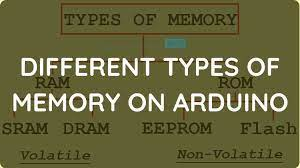
There are only two categories of memory that may be used to classify all the various memories on a computer system. Both RAM and ROM are used.
Temporary data is kept in Random-Access Memory or RAM. In systems with a microprocessor, the operating system, programmes, and other data are stored in the RAM so that the CPU can quickly access them.
RAM is used to store temporary data in systems that use microcontrollers.The firmware or application code is kept in read-only memory, which is more of permanent storage.

Volatile vs. Non-Volatile
Based on their dependence on electricity, memories can also be categorised in other significant ways. As long as power is provided, memories like RAM can store data, but if the power is turned off, the data is lost. Volatile Memory is the name for this kind of memory.
However, because the data in non-volatile memories, like ROM, is independent of power and is retained even when power is removed, they are also known as non-volatile memories.
Different Types of Memory on Arduino
After learning a bit more about computer memory and the many forms of memory, let’s move on to understanding the various types of memory used by Arduino.
Even Arduino contains RAM and ROM, the two fundamental types of memory found in any computer system. But what’s intriguing is how they’re arranged and how big they are.
On Arduino Boards like the UNO, Mega 2560, or Nano, there are essentially three types of memory. As follows:
- Flash
- RAM
- EEPROM
Like regular RAM, the RAM in Arduino is used to store temporary data and is likewise volatile. Application code and tiny amounts of data are stored in ROM memory types called flash and EEPROM. They are of the non-volatile variety. Let’s examine each of these three memory types on the Arduino independently and contrast their sizes on various Arduino boards.
NOTE: Strictly speaking, all of this memory is a component of the Microcontrollers on Arduino Boards (like the ATmega328P or ATmega 2560). (like UNO, Nano, Mega2560).
Flash
Flash ROM is another name for the Flash Memory. Flash is used by Arduino to store and run application code. To run the blinky programme after creating an Arduino sketch, such as a Blinky, we just click the Upload button in the Arduino IDE.
This will compile the sketch in the background, create a binary file, and save the binary file in the Flash of the Arduino. When the Arduino is reset, it will read the instructions from the flash memory and carry out the required action. The following table compares the amount of Flash Memory on some of the popular Arduino Boards.
| Arduino Board | Microcontroller | Size of Flash Memory |
| Arduino UNO | ATmega328P | 32 KB |
| Arduino Nano | ATmega328P | 32 KB |
| Arduino Mega 2560 | ATmega 2560 | 256 KB |
| Arduino Micro | ATmega32U4 | 32 KB |
| Arduino Leonardo | ATmega32U4 | 32 KB |
The bootloader, which is in charge of inserting the binary file into the flash over serial interface, really uses a portion of this flash memory.
EEPROM
EEPROM is the following sort of memory on an Arduino. Electrically Erasable Programmable Read Only Memory is referred to as EEPROM.
Actually, the previously mentioned Flash Memory is a form of EEPROM. The primary distinction is that although a Flash can be deleted at a block level, an EEPROM can only be erased at the byte level.
In order to retain small amounts of data, such as the states of input or output devices even if the Arduino loses power, EEPROM is frequently utilised in Arduino. I created a specific tutorial for the Arduino EEPROM (both internal and external).
Visit the “Arduino EEPRPM Tutorial” for further details on the internal EEPROM of the Arduino. Visit “Arduino AT24C256 EEPROM Tutorial” if you’re interested in integrating an I2C-based external EEPROM IC like the AT24C256 with Arduino.
| Arduino Board | Microcontroller | Size of EEPROM |
| Arduino UNO | ATmega328P | 1 KB |
| Arduino Nano | ATmega328P | 1 KB |
| Arduino Mega 2560 | ATmega 2560 | 4 KB |
| Arduino Micro | ATmega32U4 | 1 KB |
| Arduino Leonardo | ATmega32U4 | 1 KB |
RAM
Static Random Access Memory, or SRAM, is the official name of the RAM in Arduino. This form of RAM uses a flip-flop to hold 1-bits of data. The other type of RAM is known as DRAM, or Dynamic Random Access Memory, and it stores data on a capacitor.
In Arduino, runtime data or temporary data are stored in the SRAM (variables created by functions, interrupts). In reality, the SRAM in Arduino is broken up into numerous parts. As follows:
- Text
- Data
- BSS
- Stack
- Heap
Any instruction loaded from the flash memory is contained in the “Text” segment. The variables that are initialised in the sketch are contained in the “Data” section. Any uninitialized data is contained in the “BSS” segment (and initialises them to 0).
The pile and stack come last. The RAM area known as the stack is where functions’ and interrupts’ data are actually kept while the programme is running. Variables that you create during execution are kept in a heap.
The quantity of SRAM that is available in various Arduino Boards is listed in the following table.
| Arduino Board | Microcontroller | Size of RAM |
| Arduino UNO | ATmega328P | 2 KB |
| Arduino Nano | ATmega328P | 2 KB |
| Arduino Mega 2560 | ATmega 2560 | 8 KB |
| Arduino Micro | ATmega32U4 | 2.5 KB |
| Arduino Leonardo | ATmega32U4 | 2.5 KB |
Conclusion
I hope all of you had understand the basics of Computer Memory, the types of Computer Memory, Volatile and Non-Volatile Memories and also the different types of Memory on Arduino Boards. We Matha Electronics will be back soon with more informative blogs soon.