
I am text block. Click edit button to change this text. Lorem ipsum dolor sit amet, consectetur adipiscing elit. Ut elit tellus, luctus nec ullamcorper mattis, pulvinar dapibus leo.
Sold out


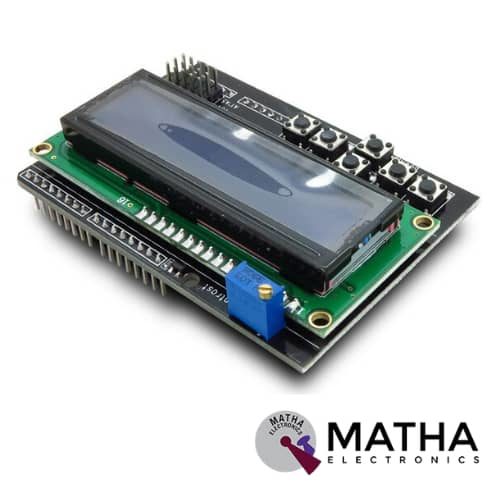
16x2 (1602) LCD Keypad Shield
Original price was: ₹450.00.₹400.00Current price is: ₹400.00. inc. GST
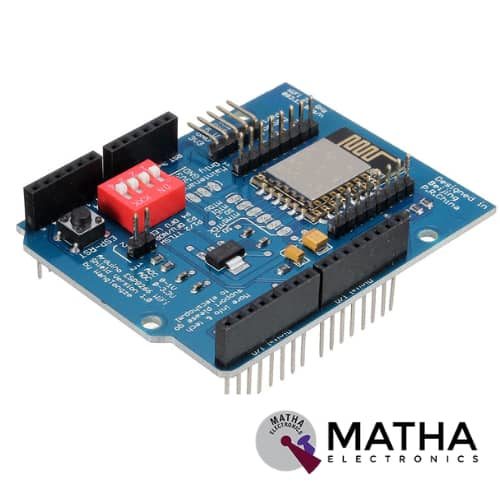
ESP8266 WIFI Shield
Original price was: ₹935.00.₹899.00Current price is: ₹899.00. inc. GST
PN532 NFC/RFID Controller Shield for Arduino
₹1,500.00 inc. GST
- PN532 chip-set
- Operating Voltage : 3.3V ~ 5v
- Support I2C, SPI
- I2C: 3.3V ~ 24V TTL
- SPI: 3.3V TTL with 100-ohm resistors in series
- Plug and play, Arduino compatible
- Built-in PCB Antenna
- Communication distance:10cm
- Easy to change mode
- NFC/RFID PN532 shield including a tuned 13.56MHz stripline antenna
- 36-pin 0.1″ header for attaching the shield to an Arduino.
- Compatible with Arduino Mega 1280 & 2560, Diecimila, Duemilanove, and UNO
Out of stock
Description
NFC/RFID Sheild was designed as a perfect tool for any 13.56MHz RFID or NFC application. This NFC shield uses the PN532 chip set. PN532 NFC Module was designed as a highly integrated radio transmission module for Near Field Communication at 13.56MHz. NFC protocol designed for smartphones and similar devices, can read and write cards and tags, interact with NFC phones, and enable communication from device to device. While the controller provides many capabilities. Our Arduino library currently only supports reading/writing tags and does not support phone-to-shield communication, tag emulation (which requires an external ‘secure element’ only available from NXP) or other more advanced features at this time.
This shield comes with a tuned 13.56MHz stripline antenna, 36-pin 0.1″ header for attaching the shield to an Arduino. In order to stack another shield on top or below, stacking headers allow pass-through stacking. This shield was designed by RF engineers using the best test equipment to create a layout. And antenna within a range of 10cm (4 inches), the maximum range possible using the 13.56MHz technology. It is quite easy to attach the shield behind a plastic plate with standoffs and still read cards through a (non-metal) barrier.
This shield supports I2C or SPI communication protocols. I2C is the default, as it uses fewer pins. Analog pins 4 and 5 are used for I2C ( you can still connect other I2C devices to the bus). And Digital #2 is used for “interrupt” notification. This means we don’t have to sit there and ‘poll’ the chip to ask a target tag has been found. The pin will pull low when a card, phone, etc is within range. The shield changes over to SPI easily where you can use any 4 digital pins by shorting two solder jumpers on the top of the PCB. These NFC/RFID Compatible with any “classic” Arduino – NG, Diecimilla, Duemilanove, UNO – as well as Mega R3 or later.
Reviews (0)
Shipping & Delivery

Related products


CAN Bus Shield
- Implements CAN V2.0B at up to 1 Mb/s
- Industrial standard 9 pin sub-D connector
- OBD-II and CAN standard pinout selectable.
- Changeable chip select pin
- Changeable CS pin for TF card slot
- Changeable INT pin
- Screw terminal that easily to connect CAN_H and CAN_L
- Arduino Uno pin headers
- Grove connectors (I2C and UART)
- SPI Interface up to 10 MHz
- Standard (11 bit) and extended (29 bit) data and remote frames
- Two receive buffers with prioritized message storage


ESP8266 WIFI Shield
- Operating voltage 5V (supplied from the Arduino Board)
- Connection via: 802.11b/g networks
- Encryption types: WEP and WPA2 Personal
- Connection with Arduino on SPI port
- on-board micro SD slot
- ICSP headers
- FTDI connection for serial debugging of WiFi shield
- Mini-USB for updating WiFi shield firmware
- 32-bit RISC architecture
- The processor can operate at 80MHz / 160MHz
- 32MB flash memory
- 64kB for instructions
- 96kB for data
- Operates in AP, Station or AP + Station mode
- It has 11 digital pins
- It has 1 analogue pin with 10-bit resolution
- Digital pins except the D0 have interrupts, PWM, I2C and one wire
- Programmable through USB or WiFi (OTA)
- Compatible with Arduino IDE
- Compatible with modules and sensors used in Arduino

MEPUNO COMMUNICATION BOARD
- Microcontroller ATMEGA328 P
- Crystal for microcontroller: 16 MHZ
- USB type B connector
- On-Board Power LED Indicator
- 5volt, 12 volt regulated circuit
- Two separate regulated 5volt power supply
- On Board On/Off switch
- On Board DC jack for powering up using adaptors
- On Board Reset Switch
- On Board TX/RX indication LEDs
- On board FTDI Driver for adruino
- Berg headers for external interfacing
- Supports I2C /GSM /GPS/RF/USART serial communication
- Separate berg headers available for PIR, Servo motor, RTC/I2C, GPS_TTL, and USART-TTL
- Four 3pin PBT Connectors
- Four SPDT 12V Relays
- Onboard DB9 connectors for GPS, GSM and USART communication
- Berg slot for 16x4 LCD connections
- Onboard TRIM-POT for LCD
- Onboard RTC IC: IN1307 with crystal 32768 MHZ crystal and CR2302 battery

NUCLEO-64 STM32G071RBT6 Development Board Arduino & ST Morpho Connectivity
- STM32 microcontroller in LQFP64 package
- 1 user LED shared with ARDUINO®
- 1 user and 1 reset push-buttons
- 768 kHz crystal oscillator
- Board connectors: ARDUINO Uno V3 expansion connectors morpho extension pin headers for full access to all STM32 I/Os
- Flexible power-supply options: ST-LINK, USB VBUS, or external sources
- On-board ST-LINK debugger/programmer with USB re-enumeration capability: mass storage, Virtual COM port and debug port
- Comprehensive free software libraries and examples available with the STM32Cube MCU Package
- Support of a wide choice of Integrated Development Environments (IDEs) including IAR Embedded Workbench®, MDK-ARM, and STM32CubeIDE
- Board-specific features
- External SMPS to generate Vcore logic supply
- 24 MHz HSE
- Board connectors: External SMPS experimentation dedicated connector Micro-AB or Mini-AB USB connector for the ST-LINKMIPI® debug connector
- Arm® Mbed Enabled™ compliant

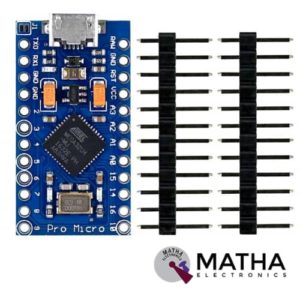


Sensor Shield V5 Expansion Board For Arduino
- Retain the merits of the V4.0 version
- Laminated design
- PCB immersion gold processing technology
- IIC interface
- Bluetooth module communication interface
- SD card module communication interface
- APC220 Wireless RF modules communication interface
- RB URF v1.1 ultrasonic sensors interface
- 12864 LCD string of line and parallel interface
- 32 servo controller interface
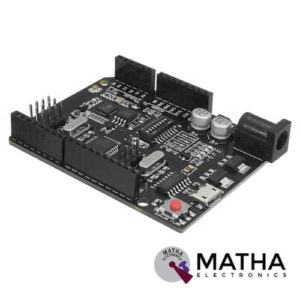

UNO R3 +WiFi ATmega328P+ESP8266 Module CH340G Compatible For Arduino Uno
- Microcontroller: ATmega328IC
- Wi-Fi: ESP8266
- USB-TTL converter: CH340G
- Power Output: 5V-800mA
- Power input USB: 5V (500mA max.)
- Power input VIN/DC Jack: 9-24V
- Power Consumption: 5V 800mA
- Logic Level: 5V
- WiFi: 802.11 b/g/n 2.4 GHz
- USB type: Micro USB
- USB Clock Frequency: 16MHz
- Operating Supply Voltage: 5V
- Digital I/O Pins: 14
- Analog I/O pins: 6
- Memory Size: 32Mb
- Interface Type: serial
- Operating temperature: −40С°/+125С°
- Dimensions (L×W)mm: 53.34×68.58


USB Host Shield
- Works with standard (dual 5/3.3V) and 3.3V-only (for example, Pro Arduino) boards.
- Operates over the extended -40°C to +85°C temperature range
- Complies with USB Specification Revision 2.0 (Full-Speed 12Mbps Peripheral, Full-/Low-Speed 12Mbps/1.5Mbps Host)
- Supports HID devices, such as keyboards, mice, joysticks, etc.
- Compatible with Mass storage devices, such as USB sticks, memory card readers, external hard drives (FAT32 Type File System – Mega Arduino only).
Reviews
There are no reviews yet.